Advanced DVR, Timeshift and Archive Workflows
Record live channels, control archive depth, use Time Shift Playback, manage storage, preview recorded material and create catch-up workflows directly from KLIPKAST Broadcaster MAX. During installation, KLIPKAST automatically partitions available disk space to prepare dedicated DVR storage.
Built for professional broadcast workflows
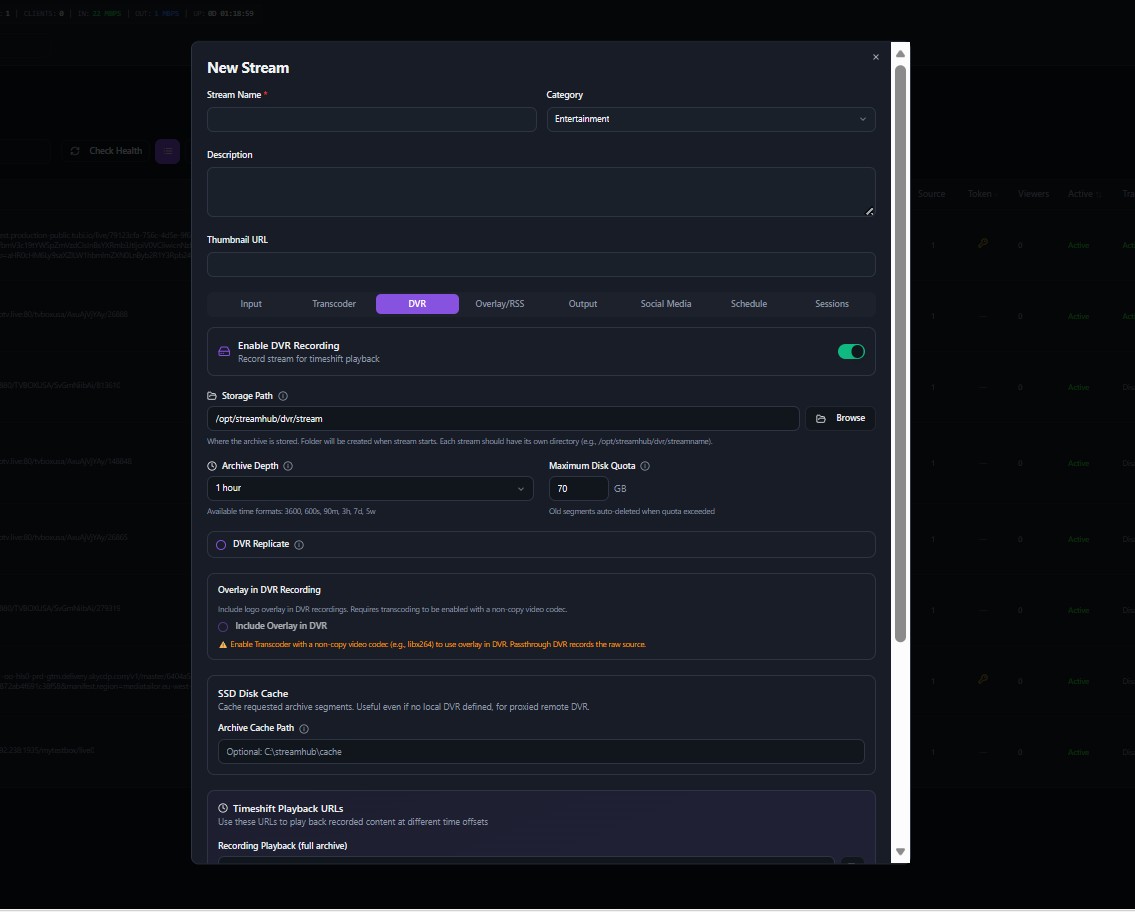
Enable DVR per stream
Built into the KLIPKAST Broadcaster MAX workflow for centralized broadcast operations.
Configure archive depth and storage quota
During installation, KLIPKAST automatically partitions available disk space to prepare dedicated DVR storage, then provides archive-depth and quota controls for ongoing operations.
Use recording playback and timeshift URLs
Built into the KLIPKAST Broadcaster MAX workflow for centralized broadcast operations.
Export clips from archived content
Built into the KLIPKAST Broadcaster MAX workflow for centralized broadcast operations.
Combine DVR with stream overlays when transcoding
Built into the KLIPKAST Broadcaster MAX workflow for centralized broadcast operations.
Monitor storage and server health
Built into the KLIPKAST Broadcaster MAX workflow for centralized broadcast operations.
Why teams choose a self-hosted workflow
KLIPKAST brings stream operations, monitoring and broadcast tools together in a single interface. It is designed for operators who want direct control of their streaming server and a workflow that remains understandable as channels and features grow.